vite搭建react

因为是想写Muxi-Forum来着,于是乎需要自己从0开始,在vite和cra(create-react-app)之间选择了vite,然后自己脑子抽抽了非要去配lint,浪费一堆时间,不过好在最后是配好了(其实还差commit hucky才算完善,不过不想再弄了

什么是vite

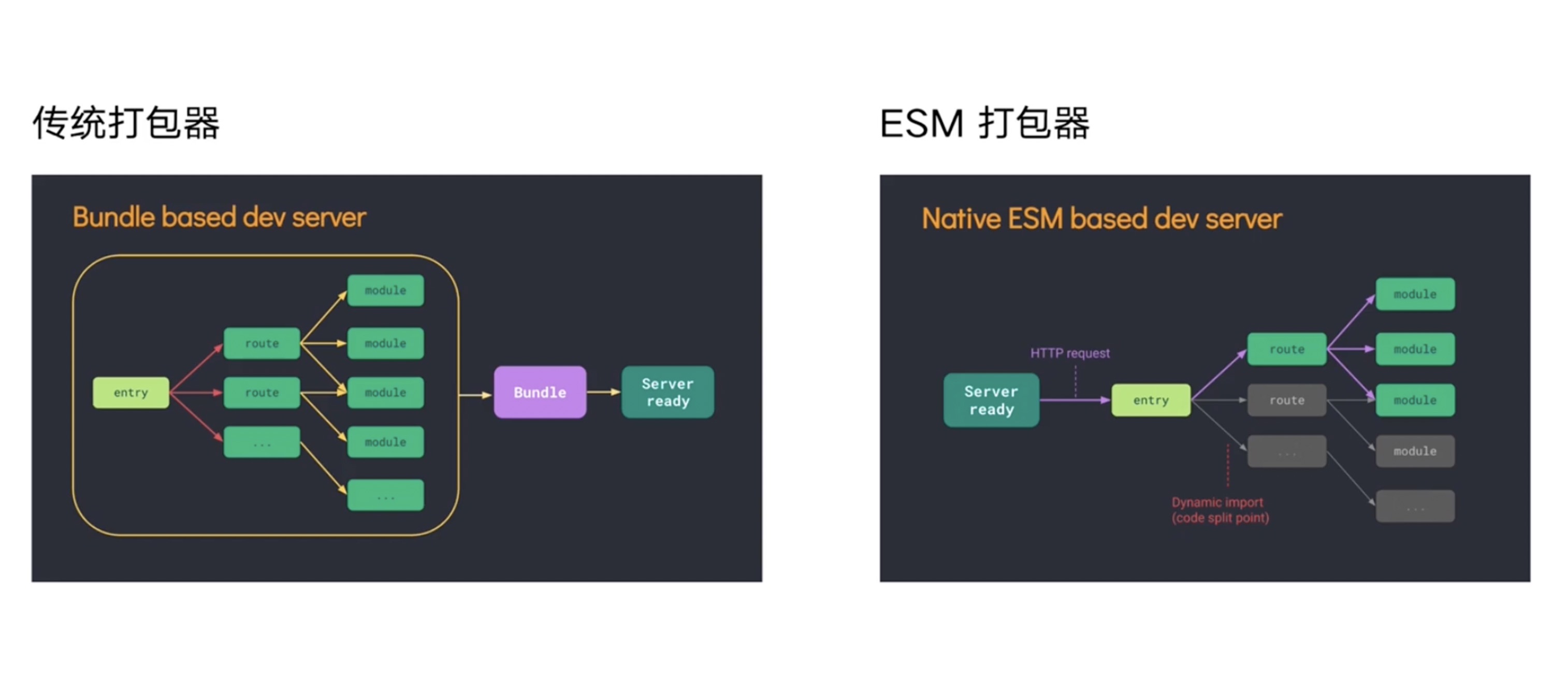
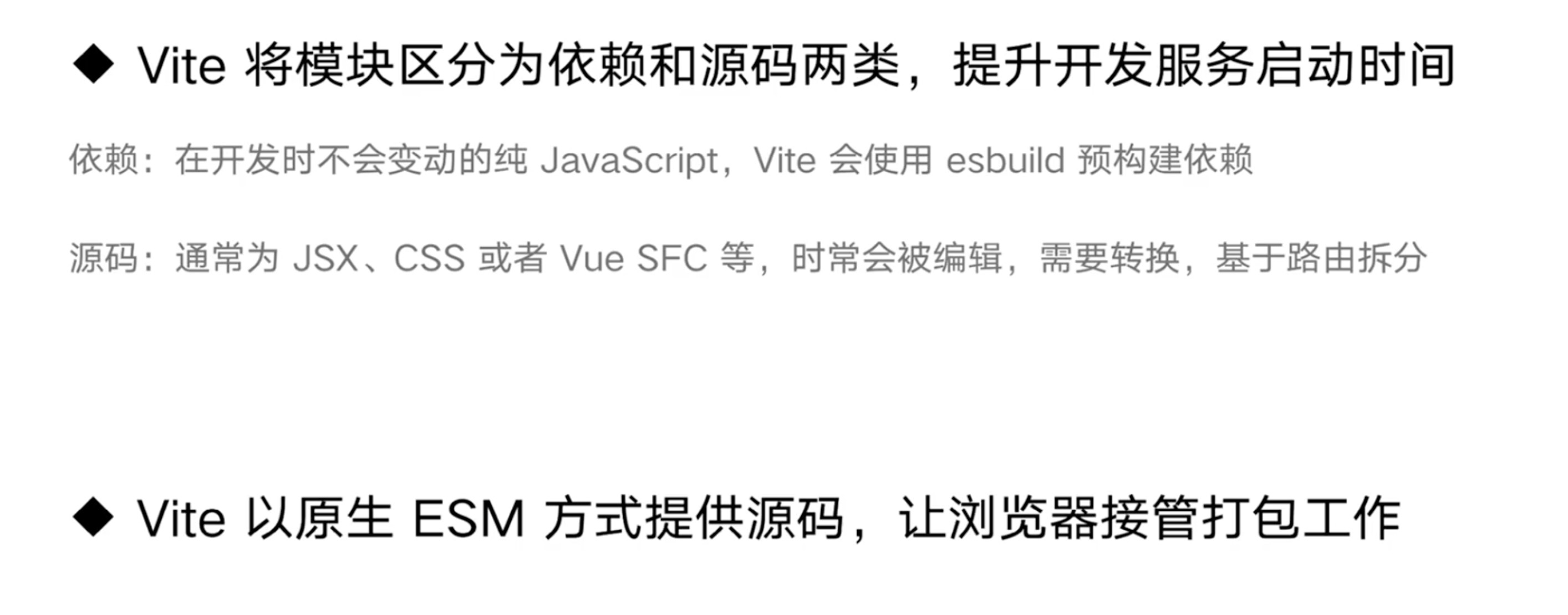
这个去自己搜官方文档吧,讲解的比我清楚好多,看两张图大概理解一下

反正就是简单的理解为,以前的都是全部打包,到vite这,变成按需打包了。

配置

好接下来就是配置阶段嘛 如何开始一个项目官方文档都讲得很清楚,这里不多赘述了

yarn create vite

然后选react-ts就行 贼快

进去之后 yarn 初始化

然后就要开始装lint插件咯

先装eslint

1
yarn add eslint --D

然后相关插件包

1
yarn add -D eslint-config-prettier eslint-plugin-import eslint-plugin-jsx-a11y eslint-plugin-prettier eslint-plugin-react eslint-plugin-simple-import-sort

关于ts的检测

1
yarn add -D @typescript-eslint/eslint-plugin @typescript-eslint/parser

然后创建俩文件

.eslintrc.js

1
2
3
4
5
6
7
8
9
10
11
12
13
14
15
16
17
18
19
20
21
22
23
24
25
26
27
28
29
30
31
32
33
34
35
36
37
38
39
40
41
42
43
44
45
46
module.exports = {
root: true,
parser: '@typescript-eslint/parser',
parserOptions: {
ecmaVersion: 2020,
sourceType: 'module',
ecmaFeatures: {
jsx: true
}
},
settings: {
react: {
version: 'detect'
}
},
env: {
browser: true,
amd: true,
node: true
},
extends: [
'eslint:recommended',
'plugin:react/recommended',
'plugin:jsx-a11y/recommended',
'plugin:prettier/recommended' // Make sure this is always the last element in the array.
],
plugins: ['simple-import-sort', 'prettier'],
rules: {
'prettier/prettier': ['error', {}, { usePrettierrc: true }],
'react/react-in-jsx-scope': 'off',
'jsx-a11y/accessible-emoji': 'off',
'react/prop-types': 'off',
'@typescript-eslint/explicit-function-return-type': 'off',
'simple-import-sort/imports': 'error',
'simple-import-sort/exports': 'error',
'jsx-a11y/anchor-is-valid': [
'error',
{
components: ['Link'],
specialLink: ['hrefLeft', 'hrefRight'],
aspects: ['invalidHref', 'preferButton']
}
]
}
}

.eslintignore

1
2
3
4
5
6
node_modules
.DS_Store
dist
dist-ssr
*.local
node_modules/*

然后装prettier

yarn add prettier -D

配置如下文件

.prettierrc.js

1
2
3
4
5
6
7
8
9
10
11
12
13
14
15
16
17
18
19
20
21
22
23
24
25
26
27
28
29
30
31
32
33
34
35
36
37
38
module.exports = {
// 一行最多 100 字符
printWidth: 100,
// 使用 4 个空格缩进
tabWidth: 4,
// 不使用缩进符,而使用空格
useTabs: false,
// 行尾需要有分号
semi: false,
// 使用单引号
singleQuote: true,
// 对象的 key 仅在必要时用引号
quoteProps: 'as-needed',
// jsx 不使用单引号,而使用双引号
jsxSingleQuote: false,
// 末尾不需要逗号
trailingComma: 'none',
// 大括号内的首尾需要空格
bracketSpacing: true,
// jsx 标签的反尖括号需要换行
jsxBracketSameLine: false,
// 箭头函数,只有一个参数的时候,也需要括号
arrowParens: 'always',
// 每个文件格式化的范围是文件的全部内容
rangeStart: 0,
rangeEnd: Infinity,
// 不需要写文件开头的 @prettier
requirePragma: false,
// 不需要自动在文件开头插入 @prettier
insertPragma: false,
// 使用默认的折行标准
proseWrap: 'preserve',
// 根据显示样式决定 html 要不要折行
htmlWhitespaceSensitivity: 'css',
// 换行符使用 lf
endOfLine: 'lf'
};

.prettierignore

1
2
3
4
5
6
node_modules
.DS_Store
dist
dist-ssr
*.local
node_modules/*

再然后就是stylelint了

直接

1
yarn add -D stylelint stylelint-config-css-modules stylelint-config-standard stylelint-order

建立.stylelintrc.js

1
2
3
4
5
6
7
8
9
10
11
12
13
14
15
16
17
18
19
20
21
22
23
24
25
26
27
28
29
30
31
32
33
34
35
36
37
38
39
40
41
42
43
44
45
46
47
48
49
50
51
52
53
54
55
56
57
58
59
60
61
62
63
64
65
66
67
68
69
70
71
72
73
74
75
76
77
78
79
80
81
82
83
84
85
86
87
88
89
90
91
92
93
94
95
96
97
98
99
100
101
102
103
104
105
106
107
108
// .stylelintrc.js
module.exports = {
processors: [],
plugins: ['stylelint-order'],
extends: [
"stylelint-config-standard",
"stylelint-config-css-modules"
],
rules: {
"selector-class-pattern": [ // 命名规范 -
"^([a-z][a-z0-9]*)(-[a-z0-9]+)*$",
{
"message": "Expected class selector to be kebab-case"
}
],
"string-quotes": "single", // 单引号
"at-rule-empty-line-before": null,
"at-rule-no-unknown": null,
"at-rule-name-case": "lower", // 指定@规则名的大小写
"length-zero-no-unit": true, // 禁止零长度的单位(可自动修复)
"shorthand-property-no-redundant-values": true, // 简写属性
"number-leading-zero": "never", // 小数不带0
"declaration-block-no-duplicate-properties": true, // 禁止声明快重复属性
"no-descending-specificity": true, // 禁止在具有较高优先级的选择器后出现被其覆盖的较低优先级的选择器。
"selector-max-id": 0, // 限制一个选择器中 ID 选择器的数量
"max-nesting-depth": 3,
"indentation": [2, { // 指定缩进 warning 提醒
"severity": "warning"
}],
"order/properties-order": [ // 规则顺序
"position",
"top",
"right",
"bottom",
"left",
"z-index",
"display",
"float",
"width",
"height",
'max-width',
'max-height',
'min-width',
'min-height',
'padding',
'padding-top',
'padding-right',
'padding-bottom',
'padding-left',
'margin',
'margin-top',
'margin-right',
'margin-bottom',
'margin-left',
'margin-collapse',
'margin-top-collapse',
'margin-right-collapse',
'margin-bottom-collapse',
'margin-left-collapse',
'overflow',
'overflow-x',
'overflow-y',
'clip',
'clear',
'font',
'font-family',
'font-size',
'font-smoothing',
'osx-font-smoothing',
'font-style',
'font-weight',
"line-height",
'letter-spacing',
'word-spacing',
"color",
"text-align",
'text-decoration',
'text-indent',
'text-overflow',
'text-rendering',
'text-size-adjust',
'text-shadow',
'text-transform',
'word-break',
'word-wrap',
'white-space',
'vertical-align',
'list-style',
'list-style-type',
'list-style-position',
'list-style-image',
'pointer-events',
'cursor',
"background",
"background-color",
"border",
"border-radius",
'content',
'outline',
'outline-offset',
'opacity',
'filter',
'visibility',
'size',
'transform',
],
}
};

然后打开vscode的设置

1
2
3
4
"editor.codeActionsOnSave": {
"source.fixAll.eslint": true,
"source.fixAll.stylelint": true
},

设置一下自动保存 就OK啦

结语

然后关于配置其实社区有很多种不同的配置方案,有兴趣的可以找找适合自己风格的,又或者自己去研究配置一套自己的风格,这里我就不多介绍了,只是给大家搭建一个小demo而已。